
Help · Guide
Review and apply improvements
Go through suggested improvements one at a time, implement or skip each, and undo any change later.
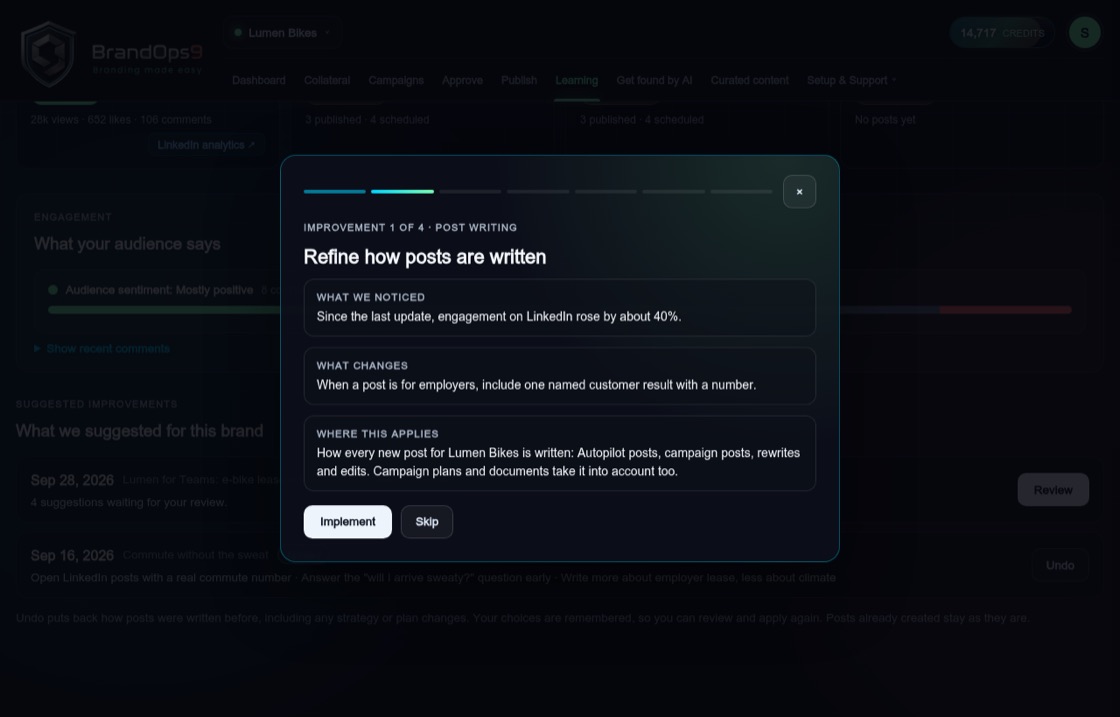
One improvement per screen
On the Learning page, press "Review" next to a row marked "Ready to review" under Suggested improvements, then "Start". Each screen shows one improvement and what kind it is: post writing, strategy, topics, posting times, visual style or audience questions. You see what we noticed, what changes, a short before and after example, and where the change applies.
Implement or skip
Press "Implement" to keep an improvement or "Skip" to leave it out. "Back" returns to the previous one. At the end, "Your choices" lists what you picked. Press "Apply" to make the changes, or "Change my choices" to go back. Only the brand you are working on changes.
What gets changed
Depending on the improvement, BrandOps9 adjusts how new posts are written, fills in or sharpens strategy answers, adds topics, moves posting times, or adds rules for images. Improvements only suggest formats BrandOps9 can publish, and similar suggestions are combined into one.
Undo and review again
Each analysis appears as one row under "Suggested improvements" on the Learning page. Once applied, press "Undo" to put back how posts were written before, including any strategy answers it changed. Posts that were already created stay as they are.
After an undo the row says "Undone". Press "Review again" to reopen the same improvements with your earlier choices already ticked, and apply what you want.
Only the newest analysis from each source (your posts and campaigns, or Get found by AI checks) can be reviewed. When a new analysis arrives, older ones you did not apply are marked "Replaced by a newer analysis": the new one rereads your results and earlier lessons and carries forward what still holds. Undo keeps working on anything you applied. Older rows are behind "Show N older analyses".