
Help · Guide
Your growth path: the 8 setup steps
The eight steps that take a new brand from setup to being recommended by AI, where to find them, and what finishes each one.
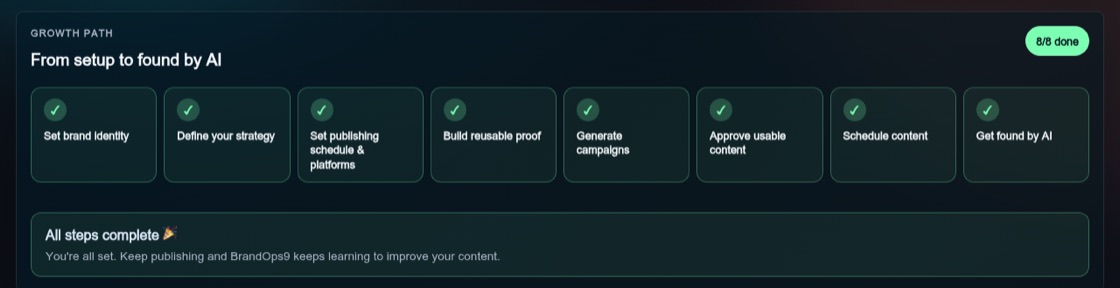
Where you find it
Every brand has a growth path on its Dashboard, under the heading "From setup to found by AI". It shows how many of the eight steps are done and which one to do next, marked "Start here". Click any step to open the right screen. Nothing is locked, so you can do the steps in any order.
When you add your first brand, a short introduction plays while BrandOps9 reads your website. It walks through the same eight steps. You can watch it again any time from Setup & Support → Watch introduction video.
The eight steps
- 1. Set brand identity: check what we found on your website and press "Confirm brand identity".
- 2. Define your strategy: check your audience, offer, proof and call to action, then press "Confirm strategy".
- 3. Set publishing schedule & platforms: choose where and how often you post on the Publish page.
- 4. Build reusable proof: create your first document, such as a one-pager or a customer story, in Collateral.
- 5. Generate campaigns: turn one idea into posts for every platform in Campaigns.
- 6. Approve usable content: review and approve what is ready on the Approve page.
- 7. Schedule content: put approved posts on the calendar on the Publish page.
- 8. Get found by AI: set up your market and buyer questions and run your first check of what AI assistants say about you.
When a step counts as done
Steps 1 and 2 are done when the profile is nearly complete and you have confirmed it. The other steps are done as soon as the work exists: a saved posting plan, a document, a campaign with posts, an approved post, a scheduled post, and a finished Get found by AI check. When all eight are done, the growth path says so and the Dashboard focuses on what needs your attention.